Form Analytics: What Drop-Off Rates Reveal About Your UX
 Jonathan Harrington
·
·
9 min read
Jonathan Harrington
·
·
9 min read

What Is Form Analytics?
Form analytics goes beyond submit-event tracking. Instead of asking “did they finish?”, it asks “where did they stop, how long did they spend, and what tripped them up?” It works by tracking individual field interactions:- Focus events — when a user clicks into or tabs to a field
- Blur events — when they leave a field (with or without filling it in)
- Change events — when a field value actually changes
- Submit events — the final action
- Error events — validation failures that block submission
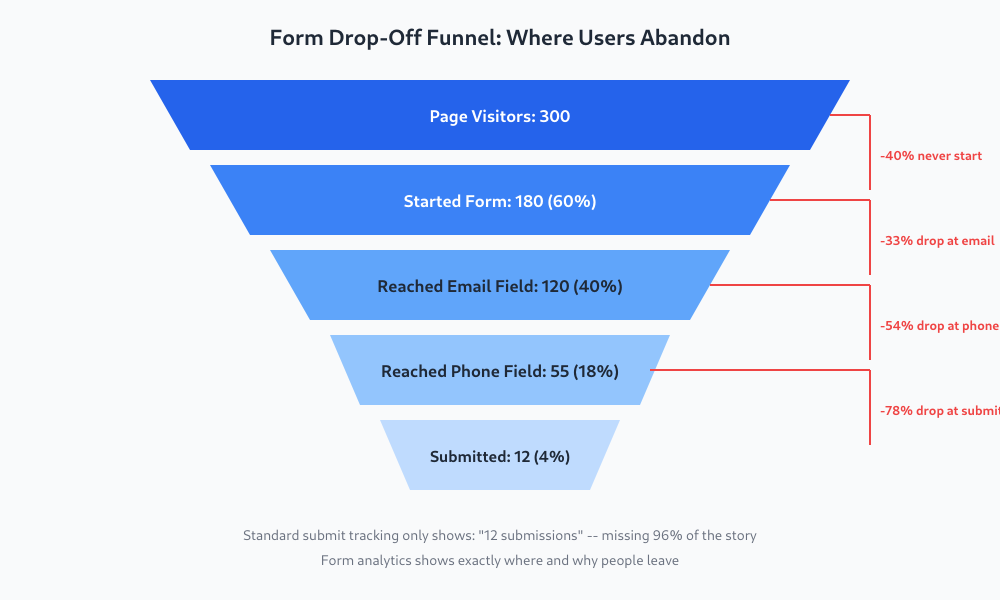 The difference between knowing “12 people submitted” and knowing “54% of users abandoned at the phone number field” is the difference between guessing and fixing.
The Five Metrics That Matter
You don’t need a dashboard with 30 charts. Five metrics give you most of the picture.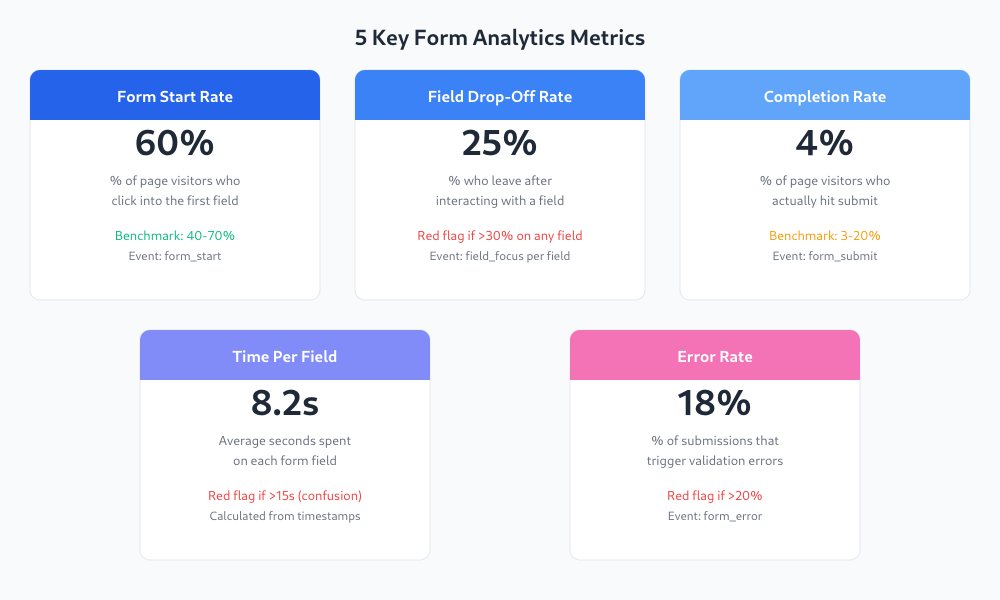
1. Form Start Rate
The percentage of page visitors who click into the first field. If this is low (below 40%), your problem isn’t the form — it’s the page. The headline, the copy above the form, or the value proposition isn’t convincing people to even begin.2. Field Drop-Off Rate
The percentage of users who interact with a field but never reach the next one. This is your most actionable metric. A spike on any specific field tells you exactly where to focus your attention. In my experience working with clients, I’ve seen single-field fixes lift overall completion rates by 20-30%.3. Completion Rate
Total submissions divided by total page visitors (or by form starts, depending on how you define it). Industry benchmarks vary wildly — 3% for complex B2B forms, up to 20% or more for simple newsletter signups. What matters is your trend, not someone else’s average.4. Time Per Field
How long users spend on each field before moving on. A field that takes 2-3 seconds is normal. One that averages 15+ seconds? People are confused, re-reading the label, or wrestling with the input format. I’ve seen address fields clock in at 20+ seconds because the form didn’t support autocomplete.5. Error Rate
The percentage of submit attempts that trigger validation errors. High error rates mean your form is fighting the user. Common culprits: phone number formatting requirements, password complexity rules, and email validation that rejects valid addresses.How to Set This Up Without Paid Tools
You don’t need Hotjar, Mouseflow, or any paid form analytics tool to get started. Google Analytics 4 with custom events handles the basics well. Here’s the approach: fire custom events at each interaction point and use field names as parameters.The Events You Need
| Event Name | When It Fires | Key Parameters |
|---|---|---|
form_start | First field gets focus | form_id, form_name |
field_focus | Any field gets focus | form_id, field_name, field_position |
field_complete | Field loses focus with a value | form_id, field_name, time_spent_ms |
form_error | Validation fails on submit | form_id, field_name, error_type |
form_submit | Successful submission | form_id, form_name |
Basic JavaScript Implementation
You can add this directly or through Google Tag Manager. Here’s a simplified version:document.querySelectorAll('form').forEach(form => {
let started = false;
const fieldTimers = {};
form.addEventListener('focusin', (e) => {
if (!e.target.name) return;
if (!started) {
gtag('event', 'form_start', {
form_id: form.id,
form_name: form.getAttribute('name')
});
started = true;
}
fieldTimers[e.target.name] = Date.now();
gtag('event', 'field_focus', {
form_id: form.id,
field_name: e.target.name
});
});
form.addEventListener('focusout', (e) => {
if (!e.target.name || !e.target.value) return;
const timeSpent = Date.now() - (fieldTimers[e.target.name] || Date.now());
gtag('event', 'field_complete', {
form_id: form.id,
field_name: e.target.name,
time_spent_ms: timeSpent
});
});
});
Reading the Data: What Drop-Offs Actually Mean
Raw numbers are useless without interpretation. Here’s what field-level drop-offs typically reveal. High drop-off at the email field: People don’t trust you yet. They’re worried about spam or they don’t see enough value to hand over their email. Fix this by adding a brief trust statement below the field: “We’ll send your guide here. No spam, unsubscribe anytime.” High drop-off at the phone number field: This is the single biggest form killer I’ve seen across dozens of client projects. People don’t want to be called. If you require a phone number and it’s not strictly necessary for your service, you’re losing leads. Make it optional and explain why you’re asking: “Only if you’d prefer a call back.” Long time spent on the address field: Your input is confusing. Maybe you’re asking them to type a full address into one field, or maybe you’ve split it into five fields (street, apt, city, state, zip) when an autocomplete solution would handle it in seconds. High error rate on submit: Your validation is too aggressive. This is especially common with phone number formats (“must include country code”), dates (“use MM/DD/YYYY only”), and passwords. Every validation error is a chance for the user to think “forget it.” This diagnostic approach connects directly to finding funnel leaks — your form is just another stage in the funnel, and it deserves the same field-by-field scrutiny you’d give any conversion step.Progressive Disclosure: Ask Less, Convert More
Here’s a principle that has improved nearly every form I’ve worked on: progressive disclosure. Instead of asking for everything upfront, ask only what’s essential for the first interaction. Qualify later. Think about what you actually need to start a conversation with a lead:- Their name (so you can address them)
- Their email (so you can respond)
- What they need help with (so you can send a relevant reply)
Practical Fixes by Field Type
Here’s what I’ve seen work best for the most common problem fields:Name Fields
Problem: Splitting into first name and last name doubles the field count and confuses people with non-Western name structures. Fix: Use a single “Full Name” field. Parse it on the backend if you need to.Email Fields
Problem: Users hesitate because they expect spam. Fix: Add a one-line statement directly below the field: “We’ll send your [specific thing] here. No newsletters unless you opt in.” Be specific about what they’ll receive.Phone Number Fields
Problem: This field has the highest drop-off rate of any common form field. Users don’t want unsolicited calls. Fix: Make it optional. Add helper text: “Optional — only if you’d prefer a callback.” If your sales team insists on phone numbers, show them the drop-off data. Pretty quickly they’ll realize 30 leads without phone numbers beats 8 leads with them.Address Fields
Problem: Multiple fields are tedious, and free-text fields lead to formatting issues. Fix: Implement browser autocomplete attributes and consider a places API for auto-fill. The time-per-field data will show you the improvement immediately.Before and After: A Real Example
Here’s a pattern I’ve seen repeatedly with client forms. A B2B lead generation form starts with six fields: first name, last name, email, phone (required), company name, and message. After reviewing the form analytics data, three changes made the difference:- Combined first and last name into one “Full Name” field
- Removed phone (moved to follow-up) and company name entirely
- Added trust copy below email and a clear, specific CTA button
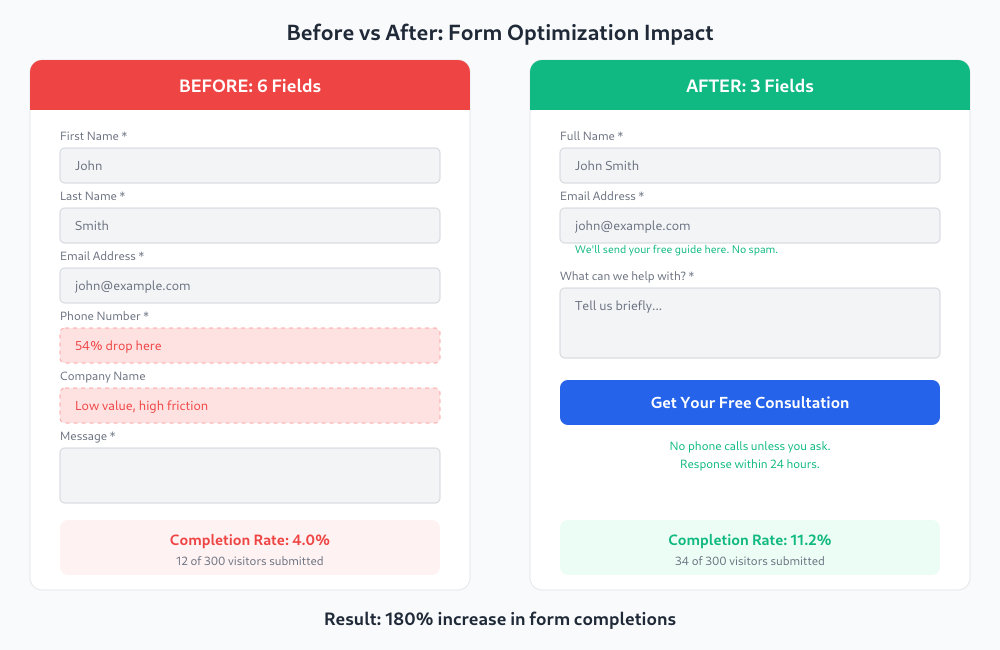 The result: completion rate went from 4% to 11.2% — a 180% increase. And the quality of leads didn’t drop. If anything, the message field gave the sales team more context than a phone number ever did.
The lesson isn’t “always use three fields.” It’s “let the data show you which fields are costing you more leads than they’re worth.”
The result: completion rate went from 4% to 11.2% — a 180% increase. And the quality of leads didn’t drop. If anything, the message field gave the sales team more context than a phone number ever did.
The lesson isn’t “always use three fields.” It’s “let the data show you which fields are costing you more leads than they’re worth.”
Frequently Asked Questions
No. You can track form field interactions with free tools like Google Analytics 4 and Google Tag Manager using custom events (form_start, field_focus, form_submit). Paid tools like Hotjar or Mouseflow add session recordings and heatmaps, which are nice but not essential. Start with free custom events, and upgrade only if you need visual playback of form interactions.
It depends on form complexity. Simple newsletter signups can hit 20-30%. Multi-field lead generation forms typically see 5-15%. Complex application forms might be 3-8%. Rather than chasing an industry benchmark, track your own rate over time and focus on improving it. A 2-3 percentage point increase often means significantly more leads with no extra traffic.
Phone number fields consistently cause the highest drop-off rates, often 40-60% of users who reach that field will abandon the form. This happens because users don’t want unsolicited phone calls. Making the phone field optional or removing it entirely and collecting phone numbers in follow-up communications is one of the most reliable ways to improve form completion rates.
There is no universal right number, but fewer fields almost always means higher completion rates. The real question is: which fields are essential for starting the conversation? For most lead generation forms, name, email, and one qualifying question are enough. Every additional field should earn its place by providing value that outweighs the leads you lose because of it. Use form analytics to measure the actual cost of each field.
Jonathan Harrington
I write practical, no-preamble guides on web analytics, privacy-friendly tracking and data-driven marketing — start with the problem, then pick the data.
More about me →