UTM Parameters Explained: How to Track Where Your Traffic Comes From
 Jonathan Harrington
·
·
8 min read
Jonathan Harrington
·
·
8 min read
You’re running campaigns across email, social media, and paid ads. Traffic is coming in. But when you open your analytics, everything just says “direct” or “referral” with no clear picture of what’s actually working.
This is where UTM parameters come in. They’re simple tags you add to your URLs that tell your analytics exactly where each visitor came from—and which campaign brought them.
What Are UTM Parameters?
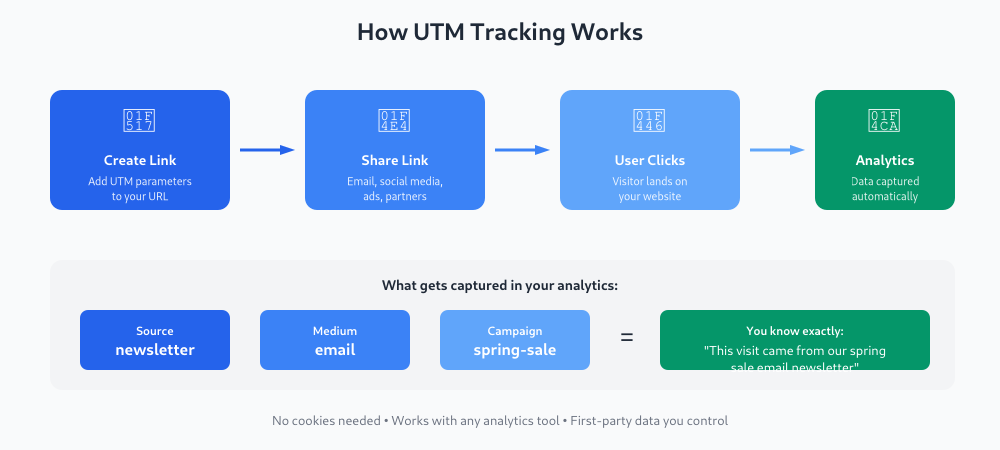
UTM parameters are short text snippets added to the end of a URL. When someone clicks that link, your analytics tool reads these parameters and attributes the visit to the right source.
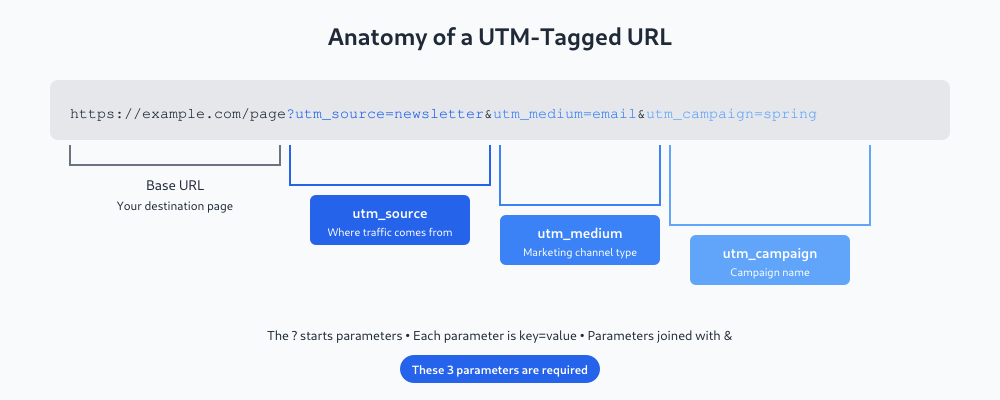
A UTM-tagged URL looks like this:
https://example.com/landing-page?utm_source=newsletter&utm_medium=email&utm_campaign=spring-saleThe part after the ? contains three UTM parameters: source, medium, and campaign. Your analytics tool (Google Analytics, Plausible, or any other) captures these automatically.
The name “UTM” comes from Urchin Tracking Module—the company Google acquired to build Google Analytics. The format stuck, and now it’s the universal standard.
The Five UTM Parameters
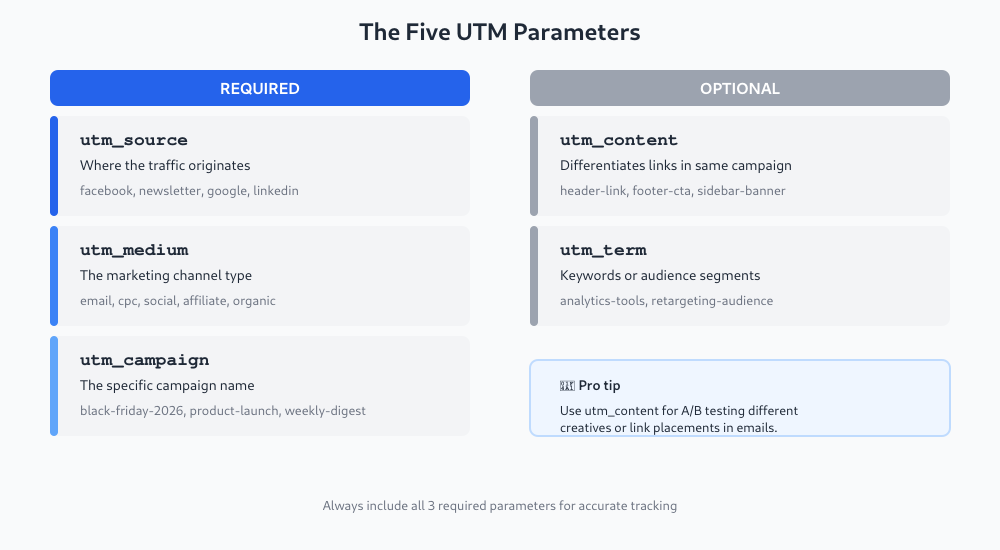
There are five UTM parameters. Three are essential; two are optional but useful.
Required Parameters
utm_source — Where the traffic comes from. This is the platform or website sending visitors.
utm_source=facebookutm_source=newsletterutm_source=google
utm_medium — The marketing channel type. This groups traffic by how it reached you.
utm_medium=emailutm_medium=cpc(cost-per-click ads)utm_medium=social
utm_campaign — The specific campaign name. This identifies which promotion or initiative drove the click.
utm_campaign=black-friday-2026utm_campaign=product-launchutm_campaign=weekly-digest
Optional Parameters
utm_content — Differentiates links within the same campaign. Useful for A/B testing or when you have multiple links in one email.
utm_content=header-linkutm_content=footer-cta
utm_term — Originally for paid search keywords. Now often used for audience segments or ad variations.
utm_term=analytics-toolsutm_term=retargeting-audience
Why UTM Tracking Matters in 2026
With iOS privacy restrictions and third-party cookie deprecation, many tracking methods have become unreliable. UTM parameters are different—they’re first-party data. Your own site collects this information directly from the URL.
This makes UTM tracking one of the few reliable methods left for understanding where your traffic actually comes from. No cookies required. No cross-site tracking. Just a URL parameter that your analytics reads.
In my experience working with clients, the ones who implement consistent UTM tracking are the ones who can actually answer “which channel drives conversions?” Everyone else is guessing.
How to Create UTM Links
You can add UTM parameters manually, but it’s easier (and less error-prone) to use a URL builder:
- Start with your destination URL
- Add
utm_source,utm_medium, andutm_campaign - Add
utm_contentorutm_termif needed - Use the generated link in your campaign
Google’s free Campaign URL Builder works well for this. Most email marketing and ad platforms also have built-in UTM fields.
UTM Naming Conventions That Actually Work
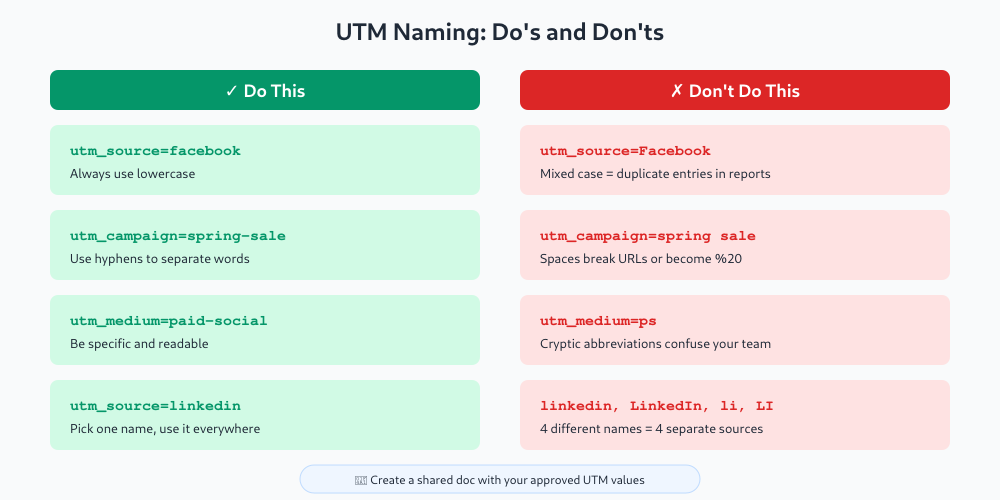
The thing most guides don’t tell you: UTM parameters are case-sensitive. Facebook, facebook, and FACEBOOK will show up as three different sources in your reports.
Here’s what I’ve seen work best:
| Rule | Example |
|---|---|
| Always lowercase | utm_source=linkedin not LinkedIn |
| Use hyphens, not spaces | utm_campaign=spring-sale not spring sale |
| Be specific but readable | utm_medium=paid-social not ps |
| Document your standards | Keep a shared spreadsheet with approved values |
Consistency matters more than cleverness. Pick a format and stick with it across your entire team.
Viewing UTM Data in Analytics
Once you’ve tagged your links, the data flows into your analytics automatically.
In Google Analytics 4: Go to Reports → Acquisition → Traffic acquisition. You’ll see sessions grouped by source, medium, and campaign.
In Plausible/Umami: Check the Sources or Campaigns section of your dashboard. These tools display UTM data without extra configuration.
The key insight: UTM parameters help you understand not just how much traffic you’re getting, but which efforts are driving it. This connects directly to deciding what conversions to track—because once you know where traffic comes from, you can measure what each source actually produces.
Common UTM Mistakes to Avoid
I’ve made these mistakes myself, so let me save you the trouble:
- Inconsistent capitalization — “Instagram” vs “instagram” fragments your data
- Using spaces — Spaces break URLs or get encoded as
%20 - Forgetting UTMs on key links — One untagged link can pollute your “direct” traffic
- Overcomplicating values —
utm_campaign=2026-q1-spring-promo-v2-finalis too much - Not testing — Always click your UTM link and verify it appears in analytics
When to Use UTM Parameters
Use UTMs for any link where you control the URL and want to track performance:
- Email newsletters and campaigns
- Social media posts (organic and paid)
- Paid ads (Google Ads, Meta, LinkedIn)
- Partner or affiliate links
- QR codes on print materials
Don’t use UTMs for internal links on your own site. That overwrites the original source and makes your data meaningless.
UTM Parameters and Google Ads: Auto-Tagging vs Manual Tagging
If you run Google Ads, you’ve probably noticed something odd: Google Ads doesn’t rely on UTM parameters by default. Instead, it appends a gclid parameter (Google Click ID) to URLs automatically. This is called auto-tagging, and it passes richer data into GA4 than UTMs alone can—things like match type, keyword quality score, and ad position.
So why would you still add manual UTM tags to Google Ads URLs?
- You use a non-Google analytics tool — Plausible, Matomo, and similar tools don’t read
gclid. They need UTMs. - You want consistent reporting across channels — If every other channel uses UTMs, having Google Ads data in a different format makes cross-channel comparison messy.
- You’re tracking in a CRM — Many CRMs capture UTM values from landing page URLs; they don’t parse
gclid.
The good news: you can run both. In GA4, auto-tagging stays on by default. You can add manual UTM parameters to your final URLs in Google Ads, and GA4 will prioritize the auto-tag data while also capturing your UTM values. To check, go to GA4 → Admin → Data Streams → your stream → Configure tag settings → Advertising features and confirm auto-tagging is connected. For a deeper look at whether your ads are actually producing results, see how to know if your ads are actually working.
Building a UTM Spreadsheet for Your Team
UTM tracking breaks down fast when multiple people create links without a shared system. One person uses utm_source=fb, another uses utm_source=facebook, a third uses utm_source=Facebook. Your reports show three different sources when it’s the same channel.
A shared UTM tracking spreadsheet fixes this. It doesn’t need to be sophisticated—a Google Sheet with a row per link works fine. Include these columns:
- Destination URL — the page you’re sending traffic to
- utm_source — from your approved values list
- utm_medium — from your approved values list
- utm_campaign — the campaign name
- utm_content — optional, for A/B variants
- utm_term — optional, for keyword or audience targeting
- Full UTM URL — the complete tagged link
- Short link — the shortened version (more on this below)
- Owner — who created or owns this link
- Date created — useful for tracking when campaigns ran
Keep a separate tab with your approved values for source and medium. Anyone building a UTM link picks from that list rather than making something up. This takes about 30 minutes to set up and saves hours of data cleanup down the road. You can build the full tagged URL with a =CONCATENATE() formula or a simple Campaign URL Builder that pastes into the sheet.
UTM Parameters and Short Links
A fully tagged UTM URL is not pretty. This:
https://example.com/landing?utm_source=instagram&utm_medium=social&utm_campaign=spring-sale&utm_content=story-cta…is 100+ characters of visual noise in a social post or bio link. It looks untrustworthy and gets truncated in some placements.
The solution is a link shortener that preserves the UTM parameters. Tools like Bitly and Short.io redirect through to the full UTM URL, so your analytics still captures every parameter. The visitor sees a clean short link; your analytics sees the full tracking data.
If you want to go further, Short.io and similar tools let you use a branded short domain—something like go.yourbrand.com/spring-sale. Branded links get more clicks than generic bit.ly links because they signal where the click is actually going. For any campaign where the link is visible to users, a branded short link is worth the five minutes it takes to set up.
Start Simple
You don’t need a complex UTM strategy on day one. Start with the basics:
- Tag your next email campaign with source, medium, and campaign
- Check your analytics after a few days to confirm the data appears
- Gradually add UTMs to social posts and ads
- Document your naming conventions as you go
Pretty quickly you’ll have a clear picture of which channels actually drive results—not just traffic, but the traffic that matters.
Keep reading: event-tracking naming conventions that scale.
Jonathan Harrington
I write practical, no-preamble guides on web analytics, privacy-friendly tracking and data-driven marketing — start with the problem, then pick the data.
More about me →